How to build a GPU cluster: from racked servers to production
Racked GPU servers can be reachable over the network and still fail their first distributed workload. Drivers, fabric, storage, and workload placement all have to agree before that hardware becomes usable capacity. For datacenter and neocloud operators, that is the difference between installed inventory and compute customers can use. For inference providers, it is the difference between a healthy dashboard and a working service.
The build needs a defined starting state, a repeatable installation sequence, and evidence that the intended workload survives ordinary failures.
1. Define the workload and the operating owner
A GPU cluster connects compute servers through networking, storage, and a control layer that assigns work. Connecting servers does not automatically combine their GPU memory. Applications need an appropriate distributed execution strategy to use GPUs across nodes.
Start with a workload contract:
- Workload: model or training code revision, precision, GPU memory requirement, GPUs per job, and whether communication crosses servers.
- Data: model weights, dataset and checkpoint sizes, storage locations, and acceptable load or restore times.
- Performance: inference request mix, concurrency, latency, and throughput targets, or training step time and scaling targets.
- Failure behavior: capacity and recovery time required when a worker, storage path, or control-plane node is unavailable.
Independent inference replicas and a model sharded across servers have different communication and recovery requirements. A datacenter should attach acceptance to the customer's workload specification. An inference provider should attach it to service behavior under a defined request mix.
Choose who owns the cluster layer at this point. Our clusterdOS engine is the open-source OS engine inside an individual cluster. It builds on Kubernetes, which orchestrates containers, and extends to virtual machine (VM) and Slurm batch-scheduling environments. Aranya OS is our proprietary multicluster operating system. It builds on clusterdOS to federate clusters into one fleet. We deliver it through fully managed clusters, covering architecture, deployment, and end-to-end operations, or self-managed software operated by the customer (currently in private alpha).
The same acceptance contract should apply whether your team or a managed partner performs the build.
2. Establish the starting configuration and readiness gates
The following worked design uses two homogeneous GPU workers and a separate Kubernetes control plane. It illustrates the build sequence, rather than prescribing hardware sizing or certifying an Aranya-supported configuration.
NVIDIA's platform support matrix includes these OS, Kubernetes, and container-runtime families and lists these GPU Operator component versions. That establishes software compatibility boundaries, not validation of the complete server, NIC, storage, and workload combination.
Record exact OS image, kernel, and package patches in the build manifest. Include firmware versions, installation values, container image digests, and the CUDA runtime and NCCL communication-library versions inside each workload image. A digest identifies fixed image contents; a moving tag such as latest does not.
Readiness checklist
Proceed only when all six conditions have an owner and a recorded pass:
- Facility ready: servers are already racked, cabled, and powered; power and cooling support the planned sustained load.
- Inventory complete: server serials, GPU identities, CPU and RAM configurations, disks, NICs, and switch-port mappings match the approved design.
- Access available: authorized operators have host access and out-of-band management access, which remains usable when the host OS fails.
- Network plan complete: addresses, routes, name resolution, time synchronization, firewall rules, and non-overlapping host, pod, and service address ranges are assigned.
- Installation inputs available: approved OS images, package repositories, container registry access, and secrets are available from every required node.
- Acceptance agreed: performance, recovery, and error thresholds are written down before the build starts.
Procurement, physical installation, and fixing inadequate facility capacity sit outside this starting condition. No deployment duration follows from the example configuration.
3. Inventory, align firmware, and provision repeatably
Capture the actual hardware before replacing its software. Preserve management-controller health logs and any existing GPU, disk, or NIC fault history. The baseboard management controller, or BMC, provides remote power control, console access, and hardware telemetry independently of Linux.
Use the server vendor's qualified firmware and BIOS profile as the baseline. Align GPU, NIC, and switch firmware with the selected driver stack. Keep separate node profiles for genuinely different hardware. Hidden differences make later performance comparisons unreliable.
Provision the OS through a repeatable network-boot or image-based workflow, then apply version-controlled configuration. Configure persistent network identities, DNS name resolution, synchronized clocks, storage mounts, secure shell (SSH) access policy, and centralized logs. Reboot a provisioned node and confirm the configuration survives.
For Kubernetes, install the selected container runtime and the matching kubeadm, kubelet, and kubectl packages. These respectively bootstrap the cluster, run its node agent, and provide its command-line client. Configure the kubelet and runtime to use the same cgroup driver, which controls process resource limits. On this Ubuntu design, use systemd. Disable swap for the baseline rather than introducing swap configuration into initial bring-up.
Assign one owner to GPU-driver installation. If GPU Operator will install the driver, leave fresh workers free of separately installed NVIDIA drivers. If the OS image owns the driver, disable the Operator's driver installation. Two installation paths create avoidable drift.
Exit gate: the inventory matches the design, firmware exceptions are resolved, and a replacement node can be reproduced from the saved inputs.
4. Prove the fabric and storage paths
Keep traffic roles explicit. Management carries cluster control and operator access. The compute fabric carries distributed GPU communication. Storage carries weights, datasets, and checkpoints. Separate physical networks are one implementation; shared infrastructure still needs deliberate capacity and congestion policies.
An ordinary IP ping proves reachability. It does not prove that the GPU workload can use the intended high-speed path.
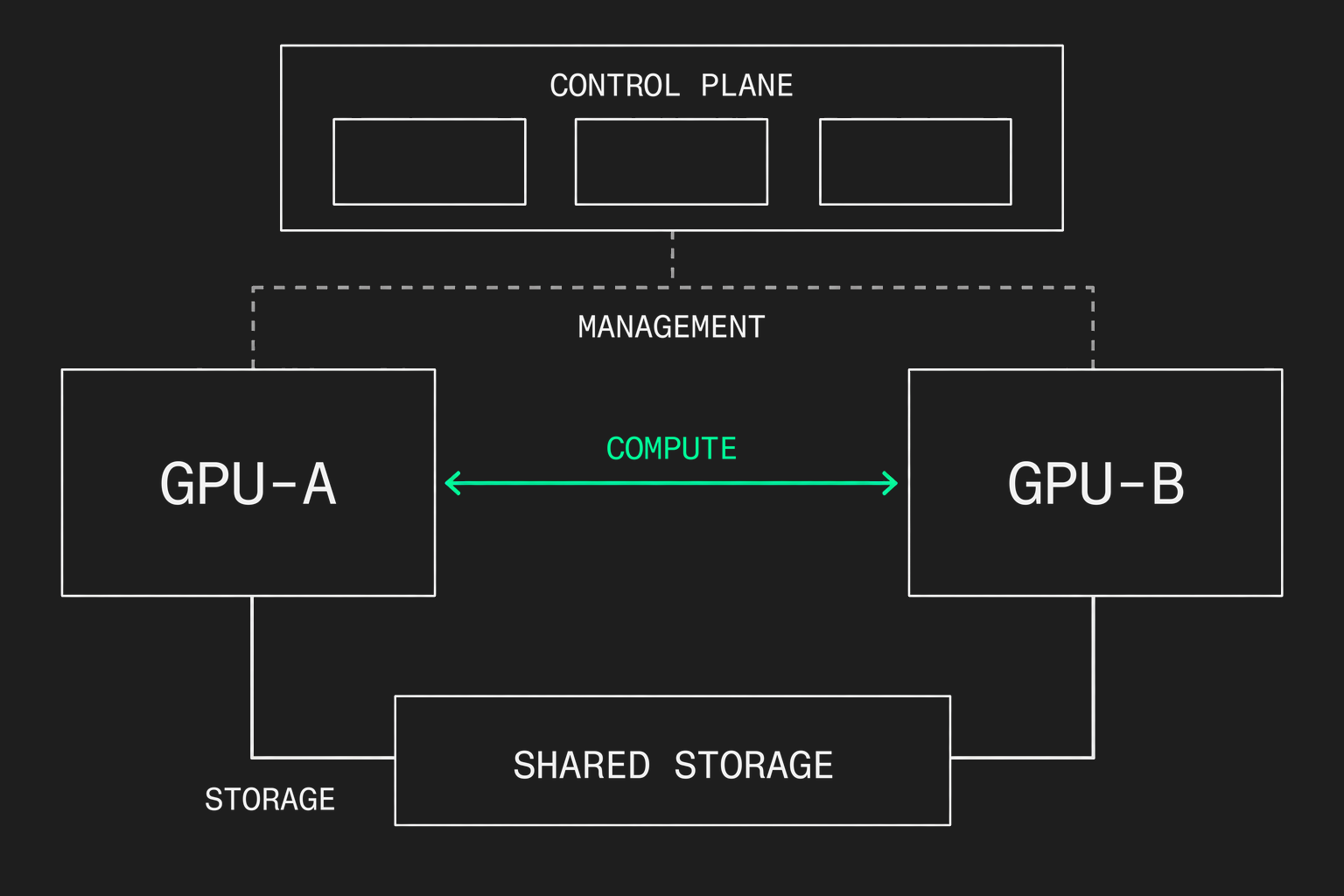
Bring up the compute fabric
InfiniBand requires a subnet manager, the service that configures the fabric's addressing and routes. Ports should report Active, the expected link layer, and the designed rate. NVIDIA's fabric diagnostic sequence separates port checks, remote-memory-transfer benchmarks, and transport error counters.
Remote direct memory access, or RDMA, lets compatible devices transfer data without routing every transfer through CPU-managed copying. Run point-to-point bandwidth and latency tests across the intended node pairs and rails, meaning the parallel network paths in the design. Measure error-counter changes during the tests, rather than treating old cumulative counters as new faults.
Test host-memory transfers first, then the GPU-memory path where GPUDirect RDMA is required. Host-memory success alone does not prove direct GPU-to-NIC transfers. Repeat with concurrent traffic so a healthy isolated link cannot hide a congested shared path.
For an Ethernet fabric using RoCE, RDMA over Converged Ethernet, use the NIC and switch vendor's validated congestion-control profile. A high link rate or jumbo-frame setting alone is insufficient. Record the endpoint and switch configuration together.
Validate durable storage and cold starts
Measure storage from every worker, first individually and then concurrently. Include model loading, dataset reads, checkpoint writes, and restoration. A warm local cache can hide the path needed when a replacement node starts empty.
For example, two workers each loading 100 GB of weights within 60 seconds require at least:
2 × 100 GB ÷ 60 seconds = 3.33 GB/s aggregate reads
That is an illustrative payload-rate floor, before transfer overhead, competing readers, and application initialization. It is neither a measured result nor a complete model-startup estimate.
Keep durable model artifacts and checkpoints off disposable local caches. Run write benchmarks only against dedicated test files or volumes, never production data or an unidentified raw disk.
Exit gate: intended paths meet their recorded thresholds under concurrent load, without unexplained transport errors, and a cold worker can recover its required data.
5. Bootstrap orchestration and enable the GPUs
Kubernetes manages containerized applications and services. Slurm queues and allocates batch jobs, including distributed training. They can also be combined in a deliberately designed stack. The workload and operating model determine the arrangement; this example continues with Kubernetes.
Use the high-availability kubeadm procedure to create the control plane:
- Create the shared API endpoint and its redundant load-balancing path before initialization.
- Initialize the first control-plane node with the saved cluster configuration, then join the other two control-plane nodes.
- Install the selected Container Network Interface, or CNI, implementation. This supplies pod networking. Its address allocation, routing, and firewall requirements must match the network plan.
- Join the GPU workers and confirm node readiness, cross-node pod communication, and internal name resolution.
- Install storage integration and the external service-entry path. For inference, include encrypted HTTPS access and routing to healthy serving replicas.
A single control-plane bootstrap is useful for a lab. It does not satisfy the control-plane failure requirement in this design.
Install one GPU enablement stack
GPU Operator coordinates the driver, NVIDIA Container Toolkit, device plugin, and GPU monitoring. The toolkit makes GPUs available inside containers. The device plugin advertises them to Kubernetes so workloads can request them.
For fresh workers using Operator-managed drivers, the pinned Operator installation uses Helm, the Kubernetes package manager:
helm install --wait gpu-operator \
  -n gpu-operator --create-namespace \
  oci://nvcr.io/nvidia/cloud-native-charts/gpu-operator \
  --version=v26.7.2
Save the chart values with the manifest. Existing driver installations, pre-existing hardware discovery, and restrictive pod-security policies require explicit installation settings. Limit privileged infrastructure components to their intended administrative scope.
GPU enablement does not configure the entire RDMA fabric. Install the selected NIC software and expose the required network devices to workload containers. GPUDirect RDMA needs a compatible GPU-to-NIC path, using either the peer-memory module or a supported DMA-BUF configuration, which allows devices to share memory buffers. NVIDIA documents these GPU-to-NIC requirements.
Confirm Operator components are healthy, its validation jobs complete, and each worker advertises eight allocatable whole GPUs. This baseline has GPU partitioning and time-sharing disabled. Then run a GPU-requesting workload on each worker. A Ready node alone is insufficient.
6. Validate hardware, distributed communication, and the real workload
Validation needs separate layers because each establishes a different fact.
Establish GPU health on every worker
Use nvidia-smi -L to enumerate GPUs and nvidia-smi topo -m to record GPU and NIC topology. NVIDIA Data Center GPU Manager, or DCGM, supplies active diagnostics and health telemetry. On idle workers, its long diagnostic suite runs with:
dcgmi diag -r 3Run intrusive diagnostics before admitting customer workloads. Retain the detailed results, temperatures, clock behavior, and error-correcting-code memory counters. Resolve diagnostic failures and new uncorrectable memory errors before proceeding. A short successful diagnostic does not replace sustained workload validation.
Confirm that a multi-node test is genuinely multi-node
NCCL, NVIDIA's Collective Communications Library, coordinates operations across GPUs. Its official test suite checks performance and correctness. Build it with MPI=1 for multi-node runs. MPI, the Message Passing Interface, launches cooperating processes across servers.
With the same test binary and libraries available on both workers, an authorized launcher, and sufficient CPU slots, these example commands cover one eight-GPU node and then all 16 GPUs:
./build/all_reduce_perf -b 8 -e 1G -f 2 -g 8mpirun -np 16 -N 8 --host gpu-a:8,gpu-b:8 \
./build/all_reduce_perf -b 8 -e 1G -f 2 -g 1Replace the example hostnames with the inventory names. The second command requires 16 distinct ranks, the participating GPU processes, in one communication group across both hosts. A launcher can otherwise produce two independent eight-GPU runs that look superficially successful. An NVIDIA maintainer identified exactly that non-MPI binary failure.
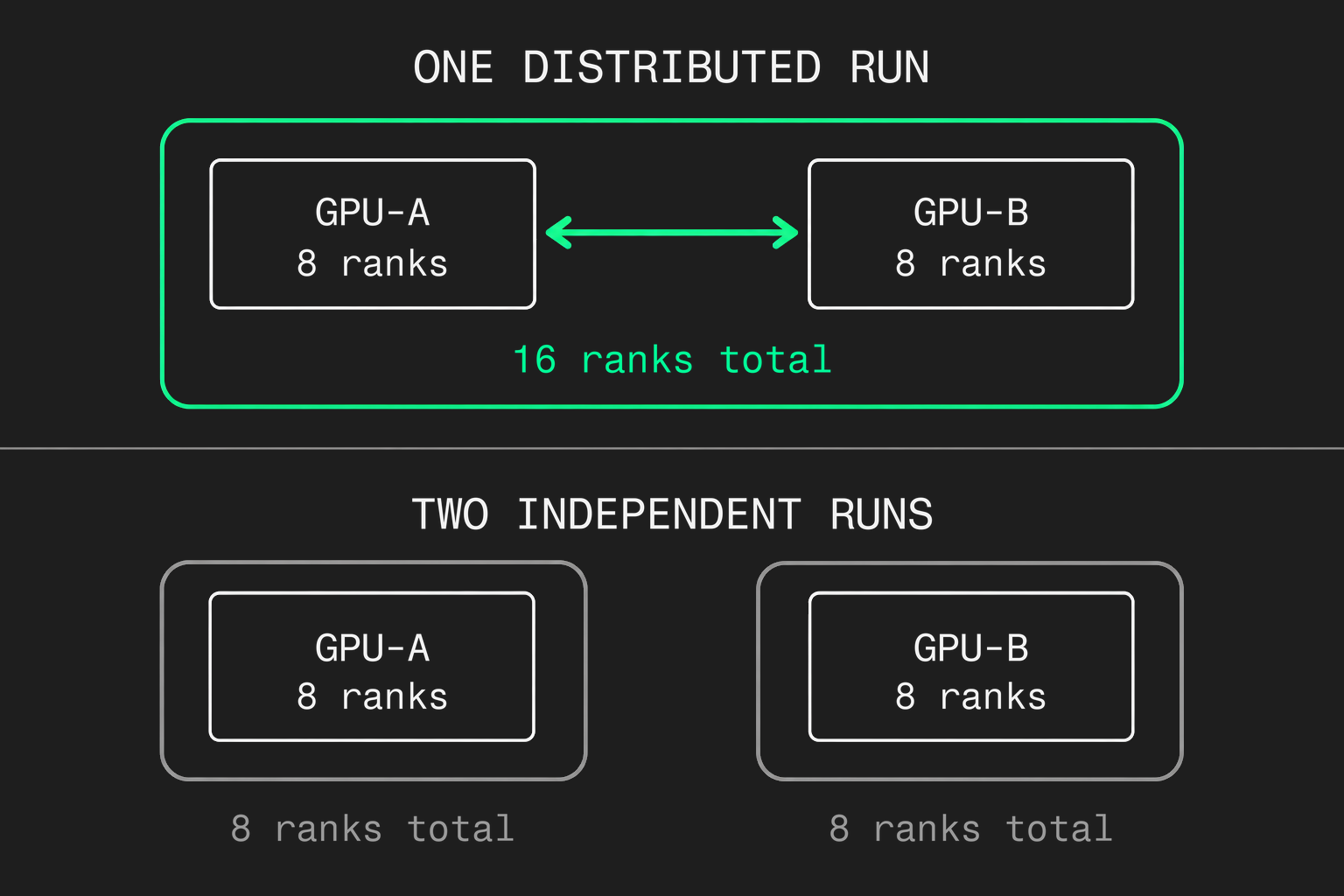
Require zero correctness errors, the expected rank and host count, and logs showing the intended transport. Compare bandwidth across the same operation, message sizes, and topology. NCCL's normalized bus bandwidth metric is different from a NIC's advertised line rate.
Repeat validation through the production scheduler and container image, with the actual GPU allocations, network-device access, storage mounts, and permissions. Host-level success does not prove that the workload container has those capabilities.
Exercise service behavior and recovery
For inference, fix the model revision, precision, serving-engine version, input/output lengths, and concurrency. Record throughput, request errors, time to first token, and p95/p99 latency, the thresholds below which 95% and 99% of requests finish. Include cold model loads and competing traffic.
For training, record step time, data-loading stalls, communication time, and checkpoint duration. Interrupt a worker in an agreed maintenance window and prove restoration from a saved checkpoint.
Remove one worker from inference service and measure recovery at the agreed load. With two workers, losing one removes half the worker count. If the surviving capacity cannot meet the failure-state target, change the capacity plan or the target before handover. Scheduling software cannot create missing GPUs.
Our inference reliability guide explains why cluster health and application health need separate signals.
7. Hand over only against explicit pass/fail criteria
Fill in every workload-specific threshold before acceptance. A missing threshold is a failed gate, because it leaves no objective way to accept the system.
Retain the inventory, topology, version manifest, configuration revision, raw test logs, workload definitions, and signed acceptance results together. Label measured outcomes as measured outcomes and capacity estimates as estimates. Include maintenance, rollback, node replacement, and restoration runbooks, with escalation ownership across the facility, cluster, and application teams.
For managed operation, document role-based permissions. We act only on the access the customer explicitly grants.
For shared customer infrastructure, namespaces and GPU allocation alone are insufficient evidence of tenant isolation. The security design needs its own explicit boundaries and acceptance cases.
The handover is complete when the next operator can reproduce the configuration, recognize a degraded path, and recover the agreed workload. If you have already-racked capacity and need that cluster layer designed and operated around your workload, talk to an engineer.
