Bare metal Kubernetes: from physical servers to a validated cluster
A Kubernetes installation can finish successfully while the cluster still cannot serve a useful workload. On physical servers, the gaps often sit outside the installer: network paths, storage behavior, hardware access, and recovery ownership.
The useful milestone for datacenter and neocloud operators is a cluster with clear operating boundaries and evidence that traffic and data take the intended paths. We start with those decisions, build a three-server reference deployment, and define the acceptance gates between a working installation and a production handover.
What bare metal Kubernetes changes
Bare metal Kubernetes runs the node operating system and container runtime directly on physical servers, without a hypervisor hosting the Kubernetes nodes. The container runtime starts containers; Kubernetes places and manages their workloads across the cluster.
This gives the operator direct control over server configuration, network interfaces, and local storage. It also puts physical provisioning, repairs, and capacity expansion in the operator's hands. Removing a virtualization layer does not establish a performance or cost advantage for every workload. Hardware utilization, staffing, networking, and recovery requirements still determine the result.
We own the cluster layer through fully managed clusters covering architecture, deployment, and end-to-end operations. Our Kubernetes-based clusterdOS engine is the open-source engine inside each cluster. Aranya OS, our proprietary multicluster operating system, builds on clusterdOS to operate within and across clusters, federating them into one fleet. The clusterdOS stack explains that inside-cluster foundation. The reference deployment here is independent of that stack and does not imply support for this exact configuration.
Define the reference deployment's boundaries
Use three fresh, dedicated physical servers on a private network. This is a single-control-plane validation cluster, with two workers. It establishes a repeatable baseline; it has neither a redundant control plane nor replicated application storage.
The control plane holds the Kubernetes API and etcd, the database containing cluster state. Workers run the sample workload. We use kubeadm to initialize the cluster, kubelet as each node's agent, and kubectl as the administration command-line tool. Keep the default control-plane scheduling restriction so that ordinary workloads stay on the workers.
| Component | Reference assumption |
|---|---|
| Servers | Three x86-64 machines, each with at least 4 CPU cores, 8 GiB RAM, and a 100 GiB SSD |
| Operating system | Ubuntu Server 24.04 LTS, stock kernel, systemd-networkd for host network configuration, and cgroup v2 for resource accounting |
| Runtime | containerd 2.3.6, package 2.3.6-1~ubuntu.24.04~noble |
| Kubernetes | kubeadm, kubelet, and kubectl 1.36.5, package 1.36.5-1.1 |
| Pod networking | Calico 3.33.0, IPv4 overlay networking, and a 1,450-byte pod packet limit |
| Service address translation | kube-proxy with iptables NAT rules; a private node port for workload access |
| Storage | One manually declared local disk volume on worker1; no automatic volume creation |
| Workload | A CPU-only HTTP file server and a client on a different worker |
These server sizes are example allocations for the exercise, not AI workload sizing. containerd's Kubernetes compatibility matrix includes its 2.3 series for Kubernetes 1.36. Calico's system requirements include Kubernetes 1.36 and Ubuntu 24.04.
Reserve these addresses in the node subnet:
| Hostname or name | Address | Purpose |
|---|---|---|
cp1 |
10.20.0.11 |
Control plane |
worker1 |
10.20.0.21 |
File server and local volume |
worker2 |
10.20.0.22 |
Cross-node client |
k8s-api.internal |
10.20.0.11 |
Stable API name, initially pointing to cp1 |
| Pod address range | 10.244.0.0/16 |
Addresses assigned to pods |
| Service address range | 10.96.0.0/12 |
Virtual addresses for Kubernetes Services |
All commands assume those addresses. Substitute a site-approved plan consistently if they overlap with existing networks, including connected VPNs. Node, pod, and Service ranges must remain distinct.
1. Prepare the hosts and network
Install Ubuntu, assign each hostname and static address, and establish sudo access before starting. Each server needs a unique hardware identity, working time synchronization, and a private default route using its node-network interface. Keep the baseboard management controller, the server's remote power and console interface, on a separate management network.
Provide DNS records or add these entries to /etc/hosts on all three hosts:
10.20.0.11 cp1 k8s-api.internal
10.20.0.21 worker1
10.20.0.22 worker2
Use a 1,500-byte maximum transmission unit, or MTU, throughout the node path. The VXLAN overlay reserves 50 bytes for its IPv4 packet wrapper, leaving a 1,450-byte pod MTU. VXLAN carries pod traffic inside packets addressed between nodes, avoiding a requirement for the switches to route pod subnets. It does not encrypt that traffic.
Protect this reference network with upstream access controls. It assumes no UFW, firewalld, or other host firewall manager competing with Calico's rules. The required private paths include:
- TCP 6443 from nodes and the administration network to
cp1. - TCP 10250 from the control plane to nodes for kubelet operations.
- UDP 4789 between all nodes for VXLAN, plus TCP 5473 to nodes hosting Calico Typha, its networking-state distribution component. Operator installations always deploy Typha and scale its replicas with cluster size, so the TCP 5473 rule also applies to this three-node cluster.
- TCP 30080 from the administration network to the workers for the sample endpoint.
- DNS and time-service access, plus outbound HTTPS for package and image downloads, including registry redirects.
The Kubernetes port reference identifies component ports. Keep etcd's TCP 2379–2380 isolated from workers and public clients. This topology needs no cross-host etcd access.
On every host, disable swap for this configuration and enable forwarding:
sudo swapoff -a
sudo sed -i.bak '/^[^#].*[[:space:]]swap[[:space:]]/s/^/#/' /etc/fstab
sudo modprobe overlay
sudo modprobe br_netfilter
cat <<'EOF' | sudo tee /etc/modules-load.d/kubernetes.conf
overlay
br_netfilter
EOF
cat <<'EOF' | sudo tee /etc/sysctl.d/99-kubernetes.conf
net.ipv4.ip_forward = 1
net.bridge.bridge-nf-call-iptables = 1
EOF
sudo sysctl --system
The expected host baseline is an empty swapon --show, synchronized time in timedatectl status, and net.ipv4.ip_forward = 1 from sysctl net.ipv4.ip_forward. This assumes the fresh installation has no additional swap generator.
2. Install the runtime and Kubernetes tools
Run the following on every host. The Docker-maintained repository supplies the containerd.io runtime package, including runc, the low-level container launcher. We do not install Docker Engine. Fresh hosts must have no conflicting containerd, runc, or Docker packages already installed.
sudo apt-get update
sudo apt-get install -y ca-certificates curl gpg
sudo install -d -m 0755 /etc/apt/keyrings
sudo curl -fsSL https://download.docker.com/linux/ubuntu/gpg \
  -o /etc/apt/keyrings/docker.asc
sudo chmod a+r /etc/apt/keyrings/docker.asc
cat <<'EOF' | sudo tee /etc/apt/sources.list.d/docker.sources
Types: deb
URIs: https://download.docker.com/linux/ubuntu
Suites: noble
Components: stable
Architectures: amd64
Signed-By: /etc/apt/keyrings/docker.asc
EOF
curl -fsSL https://pkgs.k8s.io/core:/stable:/v1.36/deb/Release.key \
  | sudo gpg --dearmor -o /etc/apt/keyrings/kubernetes.gpg
cat <<'EOF' | sudo tee /etc/apt/sources.list.d/kubernetes.list
deb [signed-by=/etc/apt/keyrings/kubernetes.gpg] https://pkgs.k8s.io/core:/stable:/v1.36/deb/ /
EOF
sudo apt-get update
sudo apt-get install -y \
  containerd.io=2.3.6-1~ubuntu.24.04~noble \
  kubelet=1.36.5-1.1 kubeadm=1.36.5-1.1 kubectl=1.36.5-1.1
sudo apt-mark hold containerd.io kubelet kubeadm kubectl
sudo mkdir -p /etc/containerd
sudo containerd config default | sudo tee /etc/containerd/config.toml >/dev/null
sudo sed -i 's/SystemdCgroup = false/SystemdCgroup = true/' \
  /etc/containerd/config.toml
sudo systemctl enable --now containerd kubelet
sudo systemctl restart containerd
The runtime and kubelet use the systemd cgroup driver to agree on resource management. Its containerd 2.x configuration differs from 1.x; the Kubernetes runtime configuration guidance shows both layouts. The generated default configuration keeps the Container Runtime Interface, or CRI, enabled so kubelet can control containerd.
The packages are deliberately pinned. Holding them prevents an ordinary package upgrade from changing the cluster version; a separate upgrade procedure must keep security patches moving. Kubernetes uses minor-specific package repositories.
A restarting kubelet before bootstrap is expected because its cluster configuration does not yet exist.
3. Bootstrap the control plane and join workers
On cp1, save this as cluster.yaml. kubeadm bootstraps the control plane; kube-proxy installs iptables rules for destination NAT (network address translation), replacing a Service IP and port with a backend pod's IP and port.
apiVersion: kubeadm.k8s.io/v1beta4
kind: InitConfiguration
localAPIEndpoint:
  advertiseAddress: 10.20.0.11
  bindPort: 6443
nodeRegistration:
  criSocket: unix:///run/containerd/containerd.sock
---
apiVersion: kubeadm.k8s.io/v1beta4
kind: ClusterConfiguration
kubernetesVersion: v1.36.5
controlPlaneEndpoint: k8s-api.internal:6443
networking:
  podSubnet: 10.244.0.0/16
  serviceSubnet: 10.96.0.0/12
  dnsDomain: cluster.local
---
apiVersion: kubelet.config.k8s.io/v1beta1
kind: KubeletConfiguration
cgroupDriver: systemd
---
apiVersion: kubeproxy.config.k8s.io/v1alpha1
kind: KubeProxyConfiguration
mode: iptables
Initialize it, then configure kubectl for your regular administration account:
sudo kubeadm init --config cluster.yaml
mkdir -p "$HOME/.kube"
sudo install -m 0600 -o "$(id -u)" -g "$(id -g)" \
  /etc/kubernetes/admin.conf "$HOME/.kube/config"
kubectl get nodes
The API name gives a future redundant endpoint a stable address in cluster configuration. It provides no redundancy while it resolves to cp1. Kubernetes describes this shared endpoint requirement.
Keep admin.conf private. It grants cluster-administrator access. Keep the join token private, too. Run the kubeadm join command printed by initialization with sudo on each worker, adding --cri-socket unix:///run/containerd/containerd.sock. If the token expires, generate a replacement on cp1:
sudo kubeadm token create --print-join-command
The nodes can remain NotReady until pod networking exists.
4. Establish pod networking
On cp1, install the versioned Calico definitions and operator. An operator is a controller that maintains a component's declared configuration. These commands follow the upstream on-premises installation path.
kubectl create -f https://raw.githubusercontent.com/projectcalico/calico/v3.33.0/manifests/v3_projectcalico_org.yaml
kubectl create -f https://raw.githubusercontent.com/projectcalico/calico/v3.33.0/manifests/tigera-operator.yaml
kubectl wait --for=create crd/installations.operator.tigera.io --timeout=180s
kubectl wait --for=create crd/apiservers.operator.tigera.io --timeout=180s
kubectl wait --for=condition=Established \
  crd/installations.operator.tigera.io \
  crd/apiservers.operator.tigera.io --timeout=60s
Save this as network.yaml, then run kubectl apply -f network.yaml:
apiVersion: operator.tigera.io/v1
kind: Installation
metadata:
  name: default
spec:
  calicoNetwork:
    bgp: Disabled
    linuxDataplane: Iptables
    mtu: 1450
    nodeAddressAutodetectionV4:
      cidrs:
        - 10.20.0.0/24
    ipPools:
      - cidr: 10.244.0.0/16
        blockSize: 26
        encapsulation: VXLAN
        natOutgoing: Enabled
        nodeSelector: all()
---
apiVersion: operator.tigera.io/v1
kind: APIServer
metadata:
  name: default
spec: {}
This explicitly selects the private node subnet and tunnels all cross-node pod traffic. BGP, the routing protocol used to exchange network routes, stays disabled. With VXLAN-only pod networking, the reference needs no BGP peering with switches.
The APIServer resource completes Calico's native-v3 installation path. With these native resource definitions, the operator deploys admission webhooks, which handle validation and defaulting for Calico resources, instead of an aggregation API server. This component is separate from the Kubernetes API endpoint on cp1.
The API endpoint and workload endpoint serve different purposes. Administrators send cluster commands to TCP 6443. Application clients reach TCP 30080 on a worker, where iptables NAT rules installed by kube-proxy translate the destination to the file-server pod's IP and port. A request arriving on worker2 must cross the node network to reach the server on worker1.
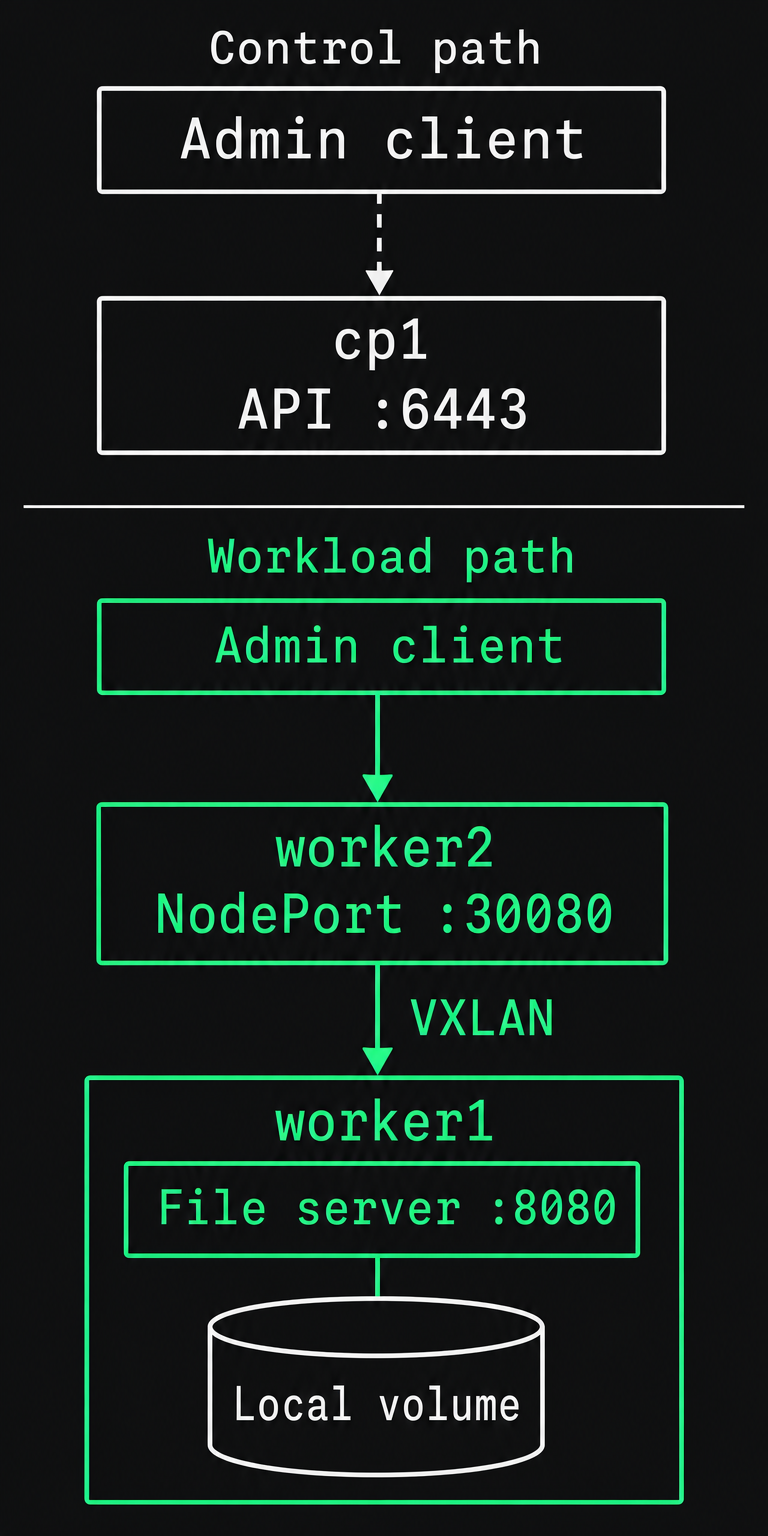
Run the first cluster acceptance gate:
kubectl wait --for=condition=Ready nodes --all --timeout=300s
kubectl -n kube-system rollout status deployment/coredns --timeout=180s
kubectl -n calico-system rollout status daemonset/calico-node --timeout=180s
kubectl wait --for=create tigerastatus/apiserver --timeout=180s
kubectl wait --for=condition=Available tigerastatus/apiserver --timeout=300s
kubectl get nodes -o wide
kubectl get pods -A
kubectl get --raw='/readyz?verbose'
Expected: all three nodes are Ready, their internal addresses match the plan, CoreDNS and Calico complete rollout, Calico's apiserver component reports Available=True, and API readiness ends with readyz check passed. CoreDNS provides name resolution inside the cluster. These are installation-health gates; they do not establish workload availability.
5. Add storage with an explicit failure boundary
A PersistentVolume, or PV, represents storage available to Kubernetes. A PersistentVolumeClaim, or PVC, is a workload's request for that storage.
For the reference, create a small local volume on worker1:
sudo install -d -m 0755 /srv/kubernetes/reference
printf '%s\n' 'bare-metal-storage-ok' \
  | sudo tee /srv/kubernetes/reference/index.html >/dev/null
This uses the existing filesystem, so no disk formatting is needed. Its advertised 1 GiB capacity is a scheduling declaration, not a filesystem quota. It is suitable for this small acceptance fixture.
Save the following as storage.yaml on cp1, then run kubectl apply -f storage.yaml:
apiVersion: v1
kind: Namespace
metadata:
  name: acceptance
---
apiVersion: storage.k8s.io/v1
kind: StorageClass
metadata:
  name: reference-local
provisioner: kubernetes.io/no-provisioner
volumeBindingMode: WaitForFirstConsumer
---
apiVersion: v1
kind: PersistentVolume
metadata:
  name: reference-local-pv
spec:
  capacity:
    storage: 1Gi
  volumeMode: Filesystem
  accessModes: [ReadWriteOnce]
  persistentVolumeReclaimPolicy: Retain
  storageClassName: reference-local
  local:
    path: /srv/kubernetes/reference
  nodeAffinity:
    required:
      nodeSelectorTerms:
        - matchExpressions:
            - key: kubernetes.io/hostname
              operator: In
              values: [worker1]
---
apiVersion: v1
kind: PersistentVolumeClaim
metadata:
  name: reference-data
  namespace: acceptance
spec:
  accessModes: [ReadWriteOnce]
  storageClassName: reference-local
  resources:
    requests:
      storage: 1Gi
The PVC can remain Pending until its consumer exists. WaitForFirstConsumer lets Kubernetes consider storage placement together with pod placement. Local volumes require volume node affinity, which ties this workload to worker1.
Deleting a pod leaves this file in place. Losing worker1 makes the volume unavailable; Kubernetes cannot move its disk contents to worker2.
For production, choose storage by required failure behavior. Rebuildable model caches can use node-local disks if cold-start recovery is acceptable. Data that must survive a server failure needs shared or replicated storage with a compatible Container Storage Interface, or CSI, driver connecting it to Kubernetes. Replication still needs a separate backup and restore plan.
6. Serve a workload across the physical network
Save this as workload.yaml on cp1, then run kubectl apply -f workload.yaml:
apiVersion: apps/v1
kind: Deployment
metadata:
  name: file-server
  namespace: acceptance
spec:
  replicas: 1
  strategy:
    type: Recreate
  selector:
    matchLabels:
      app: file-server
  template:
    metadata:
      labels:
        app: file-server
    spec:
      containers:
        - name: http
          image: busybox:1.37.0
          command: [httpd, -f, -p, "8080", -h, /data]
          ports:
            - containerPort: 8080
          resources:
            requests:
              cpu: 100m
              memory: 32Mi
            limits:
              cpu: 500m
              memory: 64Mi
          readinessProbe:
            httpGet:
              path: /
              port: 8080
          volumeMounts:
            - name: data
              mountPath: /data
              readOnly: true
      volumes:
        - name: data
          persistentVolumeClaim:
            claimName: reference-data
---
apiVersion: v1
kind: Service
metadata:
  name: file-server
  namespace: acceptance
spec:
  type: NodePort
  externalTrafficPolicy: Cluster
  selector:
    app: file-server
  ports:
    - port: 80
      targetPort: 8080
      nodePort: 30080
---
apiVersion: v1
kind: Pod
metadata:
  name: cross-node-client
  namespace: acceptance
spec:
  nodeSelector:
    kubernetes.io/hostname: worker2
  containers:
    - name: client
      image: busybox:1.37.0
      command: [sleep, "86400"]
      resources:
        requests:
          cpu: 50m
          memory: 16Mi
The local volume places the server on worker1; the client explicitly runs on worker2. This makes a same-node success insufficient to pass acceptance.
kubectl -n acceptance rollout status deployment/file-server --timeout=180s
kubectl -n acceptance wait --for=condition=Ready \
  pod/cross-node-client --timeout=180s
kubectl -n acceptance get pods -o wide
kubectl -n acceptance get pvc
kubectl -n acceptance exec cross-node-client -- \
  nslookup file-server.acceptance.svc.cluster.local
kubectl -n acceptance exec cross-node-client -- \
  wget -T 5 -qO- http://file-server.acceptance.svc.cluster.local
curl --fail --max-time 5 http://10.20.0.22:30080/
Expected: the PVC is Bound, the pods occupy their intended workers, name resolution returns the Service address, and both HTTP requests return bare-metal-storage-ok. Run the final curl from the administration network to exercise its access path.
NodePort exposes a port on the node addresses. It is sufficient for private acceptance, and Kubernetes documents its NodePort behavior. Public service delivery additionally needs an owned address-allocation or load-balancing mechanism, an HTTP routing layer where appropriate, TLS certificates, and DNS. An API load balancer and an application load balancer solve separate problems.
Finally, replace the server pod and repeat the cross-node request:
kubectl -n acceptance rollout restart deployment/file-server
kubectl -n acceptance rollout status deployment/file-server --timeout=180s
kubectl -n acceptance exec cross-node-client -- \
  wget -T 5 -qO- http://file-server.acceptance.svc.cluster.local
The expected response remains unchanged. This establishes persistence across pod replacement on the same worker. It makes no claim about server-failure recovery, GPU readiness, or inference performance.
Diagnose failures at the layer that failed
| Symptom | Likely boundary | Useful evidence |
|---|---|---|
| kubeadm initialization or worker join fails | Runtime, API reachability, or token discovery | journalctl -u containerd -u kubelet; kubeadm error output |
Nodes remain NotReady after networking installation |
Calico deployment or node-network selection | kubectl describe node worker1; Calico pod logs |
| Service name does not resolve | CoreDNS or pod-to-DNS path | Client nslookup; CoreDNS logs and Service endpoints |
| Name resolves, but cross-node HTTP fails | VXLAN path, policy, or Service NAT | Pod addresses, UDP 4789 access, and kube-proxy logs |
| Small requests work, larger transfers stall | MTU mismatch along the path | Host and pod interface MTUs; packet captures |
PVC or file-server pod stays Pending |
Volume binding or placement | kubectl -n acceptance describe pvc reference-data; pod events |
| Pod replacement loses the file | Wrong mount or ephemeral storage | PV path, pod volume mounts, and the file on worker1 |
A successful kubectl port-forward bypasses the normal client-to-Service route. It cannot replace the cross-node and NodePort acceptance gates.
Complete the production handover
Before customer workloads enter the cluster, assign an owner and acceptance evidence to each operational boundary:
| Boundary | Production handover requirement |
|---|---|
| Control-plane continuity | A redundant API endpoint and an appropriate etcd topology; evidence of surviving the intended node or rack failure |
| State recovery | Protected etcd snapshots, separate workload-data backups, and a completed restore exercise with recovery time and data-loss targets |
| Hardware lifecycle | Server inventory, remote-console access, firmware baseline, replacement procedure, and available spare capacity |
| Network and storage | Approved address ranges, MTU, service exposure, volume failure behavior, and recovery procedures |
| Security | Individual identities, role-based permissions, workload admission controls, network isolation, secret handling, and audit-log retention |
| Operations | Alerts with named responders, patch and certificate-renewal procedures, capacity limits, and maintenance windows |
| Workload performance | Acceptance under the actual concurrency, payload size, storage load, and failure conditions the service must support |
For a common stacked-etcd design, Kubernetes specifies three control-plane nodes. Spreading them across the relevant failure domains matters as much as their count. Three servers in one rack do not establish rack-level continuity.
Retain the manifests, host package versions, network plan, image digests, and acceptance outputs with the handover. The sample uses a versioned image tag for readability; production release records should retain immutable image digests. GPU drivers, device exposure, and allocation policy are additional deployment gates, outside this CPU-only baseline. Our inference reliability guidance explains why a healthy orchestrator alone cannot establish a healthy inference service.
When the goal is usable compute without building the cluster-operations function in-house, we turn already-racked and ready GPU, CPU, and storage hardware into custom, workload-tuned production clusters in 48 hours. Hardware procurement and physical installation sit outside that timeline. Talk to an engineer about your hardware, workload, and operating requirements.
